
Here is a link to view the original Google Doc.
One of the course activities in EDTECH 513 – Multimedia requires learning about and demonstrating working knowledge of the Coherence Principle. This is achieved through the process of conducting a coherence analysis on at least one multimedia e-learning artifact that is not in compliance with the Coherence Principle and then rendering a revised and compliant version of one of the artifacts. First, it is important to understand what the Coherence Principle is and how a coherence analysis is conducted.
The Coherence Principle, as it relates to multimedia, states that “information in the form of added text, added graphics, and background sound” should not be included in e-learning artifacts (Clark & Mayer, 2016, p. 152). This means all of the swirling transition effects, sweet graphics, and boing-boing sound effects that are available to dress up any mundane PowerPoint are, for the most part, forbidden in the interest of creating e-learning materials that are truly supportive learner success. A coherence analysis is the process of evaluating an e-learning presentation to determine if its design aligns with the requirements of the of the Coherence Principle concerning extraneous or unrelated text, graphics, or sound.
My daughter, K, is in elementary school. She is an inquisitive child and always full of questions. Lately, she has been very interested in anatomy, especially the human eye. Because of this curiosity about the human body, I have spent a lot of time looking at resources about eyeballs. It should come as no surprise, then, that I decided to conduct a coherence analysis on e-learning artifacts on the human eye.
I analyzed two artifacts that provided information about the human eye: one animated video and one static slide from a SlideShare presentation. The subject matter was the main connection between the two artifacts, not the presentation style. As the father of a young learner I wanted to investigate an artifact aimed at children and, as an academic librarian, one aimed at older learners. The animated video was directed at young learners. It contained many violations of the Coherence Principle in the form of extraneous graphics, distracting animations, background music, and unnecessary text. The static slide was slightly better. The violations present on the slide pertained to extraneous text and complex graphics where simple graphics would have produced less visual noise for the learner. Here is the original static slide.
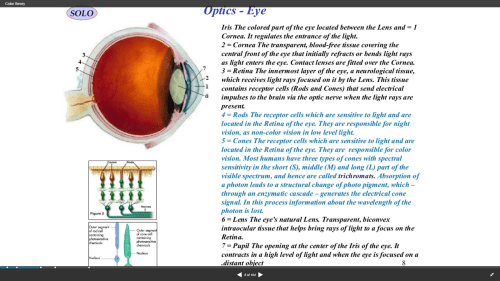
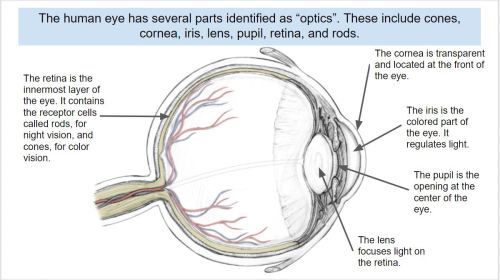
I revised the static slide in order to make it compliant with the Coherence Principle. I limited the text, reduced the number of graphics, and used a simpler graphic to represent the eye. Additionally, the revised text was added in alignment with the Contiguity Principle, which states that text should be placed near related graphics. Here is the revised slide.
The exercise was very beneficial to expanding my understanding of the Coherence Principle. I also enjoyed deconstructing an artifact and making improvements to it that enhance its usefulness to learners.
The creation of this artifact meets AECT standards 1.2 – Message Design, 1.3 – Instructional Strategies, and AECT Revised standard 1.3 Assessing/Evaluating. I demonstrated competence in the area of message design by analyzing existing e-learning artifacts, deconstructing them, and revising them to meet learner needs according to research-based principles. Additionally, the activity required me to consider the appropriate instructional strategies to use in delivering e-learning content to learners. Finally, the process of conducting a Coherence Analysis and revising the static slide provided me with the opportunity to effectively integrate the e-learning materials into a Google Document for distribution to learners.
Until next time, keep reading!
Best,
Lance


 Lance McGrath: EDTECH Learning Log