Tag Archives: technology

Coherence Analysis

Here is a link to view the original Google Doc.

One of the course activities in EDTECH 513 – Multimedia requires learning about and demonstrating working knowledge of the Coherence Principle. This is achieved through the process of conducting a coherence analysis on at least one multimedia e-learning artifact that is not in compliance with the Coherence Principle and then rendering a revised and compliant version of one of the artifacts.  First, it is important to understand what the Coherence Principle is and how a coherence analysis is conducted.

The Coherence Principle, as it relates to multimedia, states that “information in the form of added text, added graphics, and background sound” should not be included in e-learning artifacts (Clark & Mayer, 2016, p. 152). This means all of the swirling transition effects, sweet graphics, and boing-boing sound effects that are available to dress up any mundane PowerPoint are, for the most part, forbidden in the interest of creating e-learning materials that are truly supportive learner success. A coherence analysis is the process of evaluating an e-learning presentation to determine if its design aligns with the requirements of the of the Coherence Principle concerning extraneous or unrelated text, graphics, or sound.

My daughter, K, is in elementary school. She is an inquisitive child and always full of questions. Lately, she has been very interested in anatomy, especially the human eye. Because of this curiosity about the human body, I have spent a lot of time looking at resources about eyeballs.  It should come as no surprise, then, that I decided to conduct a coherence analysis on e-learning artifacts on the human eye.

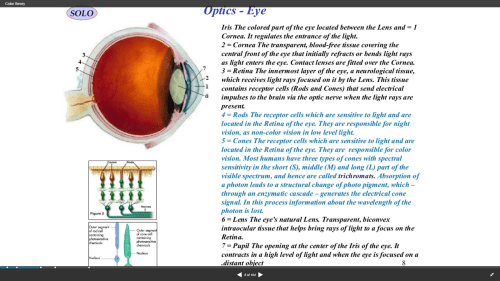
I analyzed two artifacts that provided information about the human eye: one animated video and one static slide from a SlideShare presentation. The subject matter was the main connection between the two artifacts, not the presentation style. As the father of a young learner I wanted to investigate an artifact aimed at children and, as an academic librarian, one aimed at older learners.  The animated video was directed at young learners. It contained many violations of the Coherence Principle in the form of extraneous graphics, distracting animations, background music, and unnecessary text. The static slide was slightly better. The violations present on the slide pertained to extraneous text and complex graphics where simple graphics would have produced less visual noise for the learner. Here is the original static slide.

Screenshot 2018-03-16 10.17.59

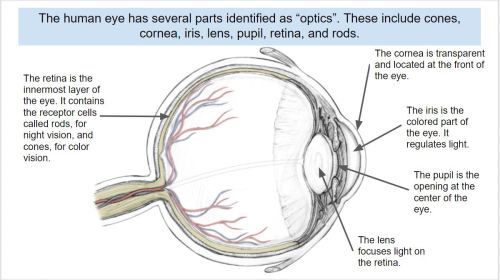
I revised the static slide in order to make it compliant with the Coherence Principle. I limited the text, reduced the number of graphics, and used a simpler graphic to represent the eye. Additionally, the revised text was added in alignment with the Contiguity Principle, which states that text should be placed near related graphics. Here is the revised slide.

Coherence Theory compliant

The exercise was very beneficial to expanding my understanding of the Coherence Principle. I also enjoyed deconstructing an artifact and making improvements to it that enhance its usefulness to learners.

The creation of this artifact meets AECT standards 1.2 – Message Design, 1.3 – Instructional Strategies, and AECT Revised standard 1.3 Assessing/Evaluating.  I demonstrated competence in the area of message design by analyzing existing e-learning artifacts, deconstructing them, and revising them to meet learner needs according to research-based principles. Additionally, the activity required me to consider the appropriate instructional strategies to use in delivering e-learning content to learners. Finally, the process of conducting a Coherence Analysis and revising the static slide provided me with the opportunity to effectively integrate the e-learning materials into a Google Document for distribution to learners.

Until next time, keep reading!

Best,
Lance

4 Comments

Filed under 1.3 Assessing/Evaluating, Standard 1: Content Knowledge, Uncategorized

HaikuDeck Artifact

Screenshot of the title page for a Haiku Deck presentation for Cruzen Murray Library

Haiku Deck presentation for the Cruzen-Murray Library at The College of Idaho

Follow the link below to view the Haiku Deck:

This week in EDTECH 513 we explored Haiku Deck. For those unfamiliar, Haiku Deck is a browser-based presentation tool similar to PowerPoint or Google Slides. The upside to Haiku Deck is that the amount of text that can be placed on a slide is limited. “Madness!” you say, “I want to be overwhelmed by volumes of text and placed in a PowerPoint coma!” Yes, I understand. Some might consider this a downside, but there is a definite positive effect inherent in this method. The power of visual communication is allowed to exercise its strength. This is the multimedia principle in very lean form. The images are allowed to communicate the core message. Text is given a space on the side bar. Words are still present, but they are not granted the prime real estate normally reserved them on the printed page.

It was a real pleasure to work on this particular class activity. I was provided with an opportunity to share information about an absolutely incredible new building on the campus of The College of Idaho: The Cruzen-Murray Library. (My new work home!) After a year of construction, the library just opened a few weeks ago at the beginning of February. The Haiku Deck platform provided a perfect digital platform to showcase both the library itself and the ideas behind its form and function. The alignment of class application and need for an expressive outlet could not have come together more seamlessly for me.

The project provided more evidence to me, as an educator and communicator, of the power of multimedia to deliver a message. Images, in collaboration with appropriately placed text, are incredibly powerful communication devices. I am excited to continue to learn more ways of applying the multimedia principle in all of the materials I develop – from handouts to presentations.

The creation of this artifact meets AECT standards 1.2 – Message Design, 1.3 – Instructional Strategies, and 2.3 – Computer-based Technologies. First, this artifact meets AECT Standard 1.2. As with the static multimedia tutorial I created using the (almost) defunct Clarify-it I followed a systematic method in the creation of this presentation. The images were carefully curated from personal and stock images in order to tell the story of the Cruzen-Murray Library and deliver a well-designed message that is aligned with the research-based multimedia design principle.  Second, regarding Standard 1.3, I utilized the instructional multimedia design principles of the contiguity principle and the chunking principle. Images were placed in positions of primary focus and words which conveyed core ideas were superimposed on the images in legible fonts in a contrasting color. Supporting text was placed in the appropriate section for speaker notes. Text on slides was kept to a minimum. Third, in support of Standard 2.3, I used HaikuDeck, a web-based software application to create the presentation and distributed it by embedding it on my WordPress blog. The presentation is ready for sharing with others in a formal presentation or at the viewers leisure via the Internet.

Thanks for reading!

-Lance

Leave a comment

Filed under 3.1 Creating, 3.2 Using, Uncategorized

Static Multimedia Tutorial

This week in EDTECH 513 – Multimedia, we were tasked with creating a static multimedia tutorial on the topic of our choosing. What is a static multimedia tutorial? Doesn’t multimedia mean sound and movement? I am glad you asked! A static multimedia tutorial is a tutorial that incorporates multimedia principles such as the use of images along with text designed in compliance with research-based design standards such as the contiguity principle. The contiguity principle states that words should be aligned with corresponding graphics. Legends that sit off to the side, away from associated graphics, for example, should not be used. Here is a great article from Moreno and Mayer about the contiguity principle (PDF).

I am an academic librarian, so the static multimedia tutorial I chose to create was library related. We receive lots of questions from new students on how to use the library. Many students come to college having used a high school library that was not supported by a modern library management system (LMS) or a public library system that was both organized using the Dewey Decimal System (we use Library of Congress) and a different LMS geared more towards public libraries. In the interest of serving the students better, I decided a basic, introductory tutorial of just seven steps would be useful. The learning objective for the tutorial is straightforward: “After following the steps in this tutorial, learners will be able to construct a search for book records in the library catalog and analyze the search results to determine a book’s owning library, format, location, availability, and call number.

I used Clarify-it to grab the screenshots and create the step-by-step instructions. The process I followed was the same one I have used to create static tutorials in the past. First, I determined the learning outcome for the tutorial. Second, I worked through the steps and documented each one. Third, I wrote down instructions for each step. Then I opened Clarify-it, formatted the pages, and started harvesting and adding screenshots. After adding the screenshots, I added strategically placed call-out boxes and arrows to draw attention to important sections of the screen. I kept instructional text close to the images (within the call-out boxes and near or connected to arrows pointing to targeted text and webpage icons).  Due to page layout, I had to place call-out boxes further from the targeted sections than I would have liked, but the design made sense given the constraints of the source material. The process was similar to using the screenshot function in Jing, SnagIt, or other screengrabbing software. I have used static tutorials in the past for library instruction, but moved away from them in favor of screencasts. I can understand the appeal of a static multimedia tutorial (no need to pause a video and continue, for example) and think I will make more of them to place on our library’s libguides for students and faculty.

Clarify-it was easy to use and had a decent set of features. I would use it again. Unfortunately, the developers of Clarify-it have decided to sunset the product in favor of pursuing other opportunities. I will need to find another application to use for creating static tutorials. I really do not want to go back to using Word or PowerPoint.

The creation of this artifact meets AECT standards 1.2 – Message Design, 1.3 – Instructional Strategies, and 2.3 – Computer-based Technologies. First, as to Standard 1.2, I followed a systematized method for creating a static multimedia tutorial artifact that can and will be used by students in learning how to successfully use the library catalog. The message was designed in accordance with the contiguity principle, which is a research-based multimedia design principle. Second, as to Standard 1.3, I utilized appropriate instructional multimedia design principles, most notably the contiguity principle and chunking principle. Third, as to Standard 2.3, I used Clarify-it, a web-based software application to create the tutorial and convert it to a PDF. I then uploaded the PDF to a shared Google Drive, set the sharing option to “Anyone with link can view”, and grabbed the embed code to make it accessible via my WordPress blog. The tutorial is ready for incorporation on the library libguides and for formal instruction with students.

Thanks for reading!

Best,
Lance


2 Comments

Filed under 3.1 Creating, 3.2 Using, Uncategorized

“Mine” place? Or Yours?: Social Media Tools and Building Presence in Online Courses

https://i0.wp.com/img15.deviantart.net/e21e/i/2016/134/f/0/medieval_village__large_house_by_spasquini-da2f9dt.png

Medieval Village: Large House. By spasquini https://spasquini.deviantart.com/art/Medieval-Village-Large-House-608732993

My boys love Minecraft. Well, at least they did when they were younger. Now they enjoy playing it with their little sister. Minecraft, if you are unfamiliar with it, is an online virtual world that can be played in different modes, the two most common being survival and create.  The point of the game is to “dig, build, and survive” (in survival mode).  The game delights in its pixelated graphics, an homage to early gaming culture (think Mario Bros. and Pac-Man).  Creators take great pride in creating elaborate mazes, fantastical structures, and replicas of actual buildings. My boys would spend hours designing precise floorplans for their homes and bases in Minecraft. I wish I had Minecraft to play with when I took drafting and mechanical drawing in high school. As I ventured through the course materials for the most recent module of the adult online learning class I am taking at BSU (EDTECH 522) I kept thinking of Minecraft.

Let me tell you why.

Module 3 in EDTECH 522 tackles the topic of online learning tools, which take advantage of Web 2.0 technology. Web 2.0 is not a standard per se, but refers to the shift from static pages to dynamic content. Think Facebook, Twitter, blogs, Pinterest, YouTube, and all those other apps and sites that enable the easy creating and sharing of information. These are fun, engaging, and exciting tools that help us connect to family, friends, coworkers, and strangers all at the click of a button and the typing of some keys. Educators seeking to innovate and provide learning environments for their students in the digital age (or the information age, if you prefer) use these same tools for educational purposes. They intentionally use the same tools used by your grandmother to share cat videos and your uncle uses to tweet about the Cubs to create educational content and support learners in online classes. So what does this have to do with Minecraft? Educators must be as thoughtful in planning and developing online classes, including the online tools they will use, as Minecrafters must be in building their amazing structures. Sure, anyone can go into create mode in Minecraft and mine away with abandon, but it takes focus, vision, and a plan to create a fine building with complex mazes, trapdoors, and hidden chambers. The same is true for educators developing and working in online classes.

Part of the planning for this module, from the student perspective, required substantial reading from two books: Chapters 11-14 in Stavredes’ Effective Online Teaching Foundations and Strategies for Student Success and Chapters 6 & 9 in Ko & Rossen’s Teaching Online: A Practical Guide 4th ed. The chapters from Stavredes focus on building a community of inquiry model as it is applied to online learning environments. Stavredes focuses on the concepts of cognitive presence, which “is developed when learners share their multiple perspectives to construct knowledge” (107), social presence, which “establishes learners as individuals and, through the process of relationship building, allows learners to engage in a community of inquiry” (131), and instructor presence, which is the manner in which the instructor interacts with the learners directly, the example the instructor sets for the class, and the processes the instructor establishes for the facilitation of communication among the course participants. As Stavredes states, “(t)he quantity, timeliness, and quality of (instructor) interactions with learners are critical to helping them persist in the course and achieve the course outcomes” (151). Stavredes also provides practical guidance on how to achieve success in bringing merging these three forms of presence. Ko & Rossen offer more practical details. All of which prove quite valuable in navigating the whys and hows of constructing and online course. I found all of this information to relevant to my coursework for the week: Evaluating a social media tool and considering its value in online education.

I chose to review and evaluate Quizlet, a popular online flashcard application. As I worked through the assignment, I thought about my online learning experiences going back to the late 1990s. I would have loved to have an app like Quizlet to help me study for Microsoft certification exams. Later on, when I was taking classes in library and information science, I would have been very grateful to have access to the same app when studying information access and retrieval and the history of librarianship. I could see how the flashcard app, with its customizable cards (students can create cards, as can instructors. There is also a live mode that facilitates collaboration!) could be used to increase social (through creating and sharing personalized decks) and instructor (through instructor narrated/created decks for class) presence, and, to a lesser extent, cognitive (by using the decks to construct a meaningful study pack) presence, in an online class. I considered how a tool like Quizlet, and many others, could be integrated into Canvas, the learning management system (LMS) in use at my school, and other online course platforms. Ko & Rossen reminded me that I needed to become more aware of what Canvas can do and what software it supports. “While you can make a start with basic knowledge of you LMS or other tools available at your institution, a deeper familiarity is only gained from actual use” (138).  I cannot just grab a bunch of resources off the Internet, slap them into a Canvas course shell, and expect students to learn. I need to take a thoughtful, informed, measured approach to incorporating online learning tools into a well-designed digital classroom. The Paul-Elder Critical Thinking Framework, referenced in Stavredes (110-111), sets standards that can be used in order to help inform the creating of online courses that build deep presence. I found this discussion of foundational theory very applicable to my work as an educator, both online and face to face.  Also, if I want to have authentic learning experiences for my students in an online class, I can employ problem-based learning, which is described in detail by Stavredes. I thoroughly enjoyed reading about all of the practical measures proposed by both Stavredes and Ko & Rossen.

But what impacted me the most was Stavredes’ discussion of learner-to-learner discussion forum interactions. I was especially impressed by the work of Brookfield and Preskill and their description of the type of disposition learners should possess in order to engage in fruitful online discussions. The “dispositions include hospitality, participation, mindfulness, humility, mutuality, deliberation, appreciation, hope, and autonomy” (135). While I try very hard to practice this disposition (just good manners, right?) in my daily interactions with others, both online and face to face, I have seen that many people do not act in a similar manner. I understand, through the readings from Stavredes and others, that the it is incumbent upon the instructor to set this tone in the online class and, because of transactional distance, the space the student feels in the online environment, it can be difficult to do. Thankfully, with the appropriate and thoughtful use of social media tools, I, as an instructor, can build a bridge (much like my boys used to do in Minecraft) that spans the transactional gap and eases the participation of the learners on their journey as a community of inquiry.  Hopefully, we can move from “mine” place and your place to our place in our online learning communities.


References:

Ko, S., & Rossen, S. (2017). Teaching online: A practical guide. Taylor & Francis.

Minecraft. Wikipedia. https://en.wikipedia.org/wiki/Minecraft

Quizlet. www.quizlet.com

Stavredes, T. (2011). Effective online teaching: Foundations and strategies for student success. Jossey-Bass.

University of Louisville, Delphi Center. Ideas 2 Action: Paul-Elder Critical Thinking Framework. http://louisville.edu/ideastoaction/about/criticalthinking/framework.

Web 2.0. Wikipedia. https://en.wikipedia.org/wiki/Web_2.0


1 Comment

Filed under 4.3 Reflection on Practice

Technology Use Planning Overview

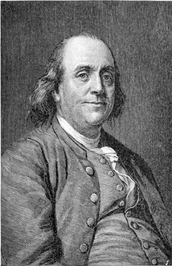
Benjamin Franklin

“By failing to prepare, you are preparing to fail.”
-Benjamin Franklin

Image and quote credit: http://www.goodreads.com/quotes/tag/planning

Wise words regarding planning, or the lack thereof, have been a part of the human story for generations – perhaps since our ancestors first began to communicate.  Benjamin Franklin, turner of many an adroit phrase, had these words to say about preparation or planning: “By failing to prepare, you are preparing to fail.”  Educators are masters of preparation.  The success or failure of many a lesson can be traced back to an inadequate or ill-conceived lesson plan.  We either prepare (plan) for failure or we plan for success.  The same goes for technology planning in education.  Technology use planning is as essential to a successful learning environment in a school or district as is a well-designed classroom lesson plan.

So what exactly is “technology use planning?”  The Guidebook for Developing an Effective Instructional Technology Plan describes states that “(t)he idea of technology planning should be an attempt to be proactive instead of reactive to the situations created by technology” (1996, p. 2).   Technology Use Planning is the attempt to successfully navigate the educational and technological landscapes in order to maximize the educational benefit of technology.  It is, in a manner of speaking, the pathway we propose to blaze through the educational landscape and the ever-changing world of technology.  Successful technology use planning is an informational process which helps all stakeholders in the educational environment understand where we are, where we believe we should be headed and how we should go about reaching our destination.  The Guidebook is an excellent resource for use in understanding why technology use planning is essential for educators and how to go about actually doing the planning work and formulating a successful plan.

The impact of technology is pervasive in the United States.    So extensive and important is the influence of technology that the United States Department of Education formulated a National Education Technology Plan (NETP) in 2010.  This essential document for educators at all levels (state, regional, district, etc.), especially technology influencers and decision-makers, serves as a vital benchmark for technology use planning.  An educator with a thorough understanding and appreciation of the core concepts of the NETP – Learning, Assessment, Teaching, Infrastructure, and Productivity – is a vital and powerful asset for achieving an effective and empowering technology use plan and turning that plan into action.  As the NETP states “(t)o transform education in America, we must turn ideas into action” (p. xvi).  Technology use and implementation that is properly planned – that takes into consideration all the factors involved: people, technology, financial resources – is essential to a transformed American educational system.

How do we realize a truly transformed educational system and not just overlay new technology on an old system?  First, educational goals must be primary and technology use secondary.  We must not fall for every technological novelty.  This concept of “technology for technology’s sake” often takes place with little understanding of where technology fits in the overall educational environment and at the expense of people and the educational process.  It becomes obstructive rather than constructive.  A study conducted by Maltby and Mackie highlights a situation where technology is not an educational cure all.  A study of the effects of a virtual learning environment (VLE) involving 1,414 undergraduate students found that VLEs do not work well for all students and can even decrease student success (2009).  A well-conceived Technology Use Plan provides guidance for the appropriate place of technology in meeting educational goals.

Second, a good technology use plan has a long view perspective with a focus on short-term goals.  Thus, short-term goals should all support the long-range “big picture” educational goals.  Writing in 1992, eons ago in information technology time, See emphasized short term technology plans focused on applications and outcomes instead of on hardware.  These holistic plans, integrated into the very fabric of the school and tied to staff professional development plans, required that technology expand on the instructional benefits of the curriculum.  In this way, See sought to keep technology in its place in educational settings while squeezing as much value as possible from it for teachers, students and other stakeholders.  See’s initial point drew a line in the sand regarding long term technology plans.  Technology plans, according to See, are only of much use if they are for a maximum period of one year (1992). Consider this: See was writing in the days before wide availability of the Internet, laptop computers, broadband and wireless access, Windows 95 or even inexpensive cellular phone service.  I agree with See.  I used to work for a Tier 2 computer company and we could barely project 3 months out, let alone a year or five years.  The whole Windows-based computer industry almost missed the application of tablet computing in the early 2000s.  I remember when Microsoft introduced incredibly expensive tablet PCs in 2001.  No one seemed to care much at the time and educational institutions balked at purchasing them.  The market dwindled to a few niche markets.  My how things have changed!  Microsoft is back with a new tablet, the Surface, in an attempt to compete with the iPad, and, perhaps, to give the PC industry “a wake-up call” (Vance, 2012). Granted, this cycle was longer than 5 years, but the rise of tablet computing was a surprise to the computer industry.  Short-term technology plans with a strong long range view allow schools of any shape or size to seize on moments of opportunity in a manner that is both nimble and proactive while avoiding the pitfalls of reactionary technology moves.

Third, a technology use plan must be grounded in reality.  This applies to budgetary as well as curricular concerns. See recommends connecting the technology plan to a district’s or institution’s budget cycle (1992).  Forging a connection between financial concerns and technology planning affirms both the importance of technology and its wisely planned use.  Having solid financial metrics tied to technology planning also encourages administrators to provide essential support to teachers, who are the ones who will actually use the technology as part of their teaching.  It is incredibly important to have proper training for teachers.  This allows for the greatest opportunity of technology adoption by those who will use it the most.  Without good training and teacher “buy in” of a technology plan there is great risk that the shiny new hardware will not meet its educational potential or, worse, just sit and gather dust.  A final reality check comes from having a plan that is grounded in solid research.  A technology use plan that includes research-backed elements such as good on-site technical support and sustained professional development stands a good chance of success (1992).

My personal experience with technology in an educational environment confirms the ideas of the material I read as part of my research on technology use planning.  The school I work at, a private liberal arts university, invests a substantial amount of both human and financial resources on information technology planning.  I serve on a committee that focuses on the application side of educational technology and our input is taken very seriously by our Information Technology Director when computing purchases are considered.  We strive to not become enamored with a technology just because it is new and shiny.  Our committee includes the following questions in any technology deliberation: “What educational value does the technology provide?”  and “What does it add to what we already have?”  Sometimes it seems like the decision-making process is excruciatingly slow but the decisions we make are grounded in solid research with an eye to educational outcomes, staff support and budgetary cycles.  Based on what I learned in this assignment I believe the institution at which I work implements technology use planning that is supported by best practices in the field.  I am better prepared to explain how and why we do what we do on the educational technology committee on which I serve.

References:

Graduate Students at Mississippi State University. (2002). Guidebook for developing an effective instructional technology plan. Retrieved from http://www.nctp.com/downloads/Guidebook35.pdf

Maltby, A., & Mackie, S. (2009). Virtual learning environments – help or hindrance for the ‘disengaged’ student?  ALT-J, Research in Learning Technology 17(1), 49-62. Retrieved from http://www.eric.ed.gov/PDFS/EJ831099.pdf

See, J. (1992). Developing effective technology plans. The Computing Teacher19(8). Retrieved from http://www.nctp.com/html/john_see.cfm

U.S. Department of Education Office of Educational Technology. (2010). National Education Technology Plan. Alexandria, VA: Education Publications Center. Retrieved from http://www.ed.gov/sites/default/files/netp2010.pdf

Vance, A. (2012, July 9).  Why Microsoft’s Surface tablet shames the PC industry.  Bloomberg Businessweek: Technology. Retrieved from http://www.businessweek.com/articles/2012-06-19/why-microsofts-surface-tablet-should-shame-the-pc-industry

This post addresses Standard 3.4 of the AECT: Policies and Regulations, which reads:  “Policies and regulations are the rules and actions of society (or it surrogates) that affect the diffusion and use of Instructional Technology.”   The completion of this activity demonstrates that I have studied and been influenced by policies devised by the U.S. Department of Education as I consider how to construct an effective Technology Use Plan.

3 Comments

Filed under 3.2 Using, Standard 3: Learning Environments