Tag Archives: 513

HaikuDeck Artifact

Screenshot of the title page for a Haiku Deck presentation for Cruzen Murray Library

Haiku Deck presentation for the Cruzen-Murray Library at The College of Idaho

Follow the link below to view the Haiku Deck:

This week in EDTECH 513 we explored Haiku Deck. For those unfamiliar, Haiku Deck is a browser-based presentation tool similar to PowerPoint or Google Slides. The upside to Haiku Deck is that the amount of text that can be placed on a slide is limited. “Madness!” you say, “I want to be overwhelmed by volumes of text and placed in a PowerPoint coma!” Yes, I understand. Some might consider this a downside, but there is a definite positive effect inherent in this method. The power of visual communication is allowed to exercise its strength. This is the multimedia principle in very lean form. The images are allowed to communicate the core message. Text is given a space on the side bar. Words are still present, but they are not granted the prime real estate normally reserved them on the printed page.

It was a real pleasure to work on this particular class activity. I was provided with an opportunity to share information about an absolutely incredible new building on the campus of The College of Idaho: The Cruzen-Murray Library. (My new work home!) After a year of construction, the library just opened a few weeks ago at the beginning of February. The Haiku Deck platform provided a perfect digital platform to showcase both the library itself and the ideas behind its form and function. The alignment of class application and need for an expressive outlet could not have come together more seamlessly for me.

The project provided more evidence to me, as an educator and communicator, of the power of multimedia to deliver a message. Images, in collaboration with appropriately placed text, are incredibly powerful communication devices. I am excited to continue to learn more ways of applying the multimedia principle in all of the materials I develop – from handouts to presentations.

The creation of this artifact meets AECT standards 1.2 – Message Design, 1.3 – Instructional Strategies, and 2.3 – Computer-based Technologies. First, this artifact meets AECT Standard 1.2. As with the static multimedia tutorial I created using the (almost) defunct Clarify-it I followed a systematic method in the creation of this presentation. The images were carefully curated from personal and stock images in order to tell the story of the Cruzen-Murray Library and deliver a well-designed message that is aligned with the research-based multimedia design principle.  Second, regarding Standard 1.3, I utilized the instructional multimedia design principles of the contiguity principle and the chunking principle. Images were placed in positions of primary focus and words which conveyed core ideas were superimposed on the images in legible fonts in a contrasting color. Supporting text was placed in the appropriate section for speaker notes. Text on slides was kept to a minimum. Third, in support of Standard 2.3, I used HaikuDeck, a web-based software application to create the presentation and distributed it by embedding it on my WordPress blog. The presentation is ready for sharing with others in a formal presentation or at the viewers leisure via the Internet.

Thanks for reading!

-Lance
Leave a comment

Filed under 3.1 Creating, 3.2 Using, Uncategorized

Static Multimedia Tutorial

This week in EDTECH 513 – Multimedia, we were tasked with creating a static multimedia tutorial on the topic of our choosing. What is a static multimedia tutorial? Doesn’t multimedia mean sound and movement? I am glad you asked! A static multimedia tutorial is a tutorial that incorporates multimedia principles such as the use of images along with text designed in compliance with research-based design standards such as the contiguity principle. The contiguity principle states that words should be aligned with corresponding graphics. Legends that sit off to the side, away from associated graphics, for example, should not be used. Here is a great article from Moreno and Mayer about the contiguity principle (PDF).

I am an academic librarian, so the static multimedia tutorial I chose to create was library related. We receive lots of questions from new students on how to use the library. Many students come to college having used a high school library that was not supported by a modern library management system (LMS) or a public library system that was both organized using the Dewey Decimal System (we use Library of Congress) and a different LMS geared more towards public libraries. In the interest of serving the students better, I decided a basic, introductory tutorial of just seven steps would be useful. The learning objective for the tutorial is straightforward: “After following the steps in this tutorial, learners will be able to construct a search for book records in the library catalog and analyze the search results to determine a book’s owning library, format, location, availability, and call number.

I used Clarify-it to grab the screenshots and create the step-by-step instructions. The process I followed was the same one I have used to create static tutorials in the past. First, I determined the learning outcome for the tutorial. Second, I worked through the steps and documented each one. Third, I wrote down instructions for each step. Then I opened Clarify-it, formatted the pages, and started harvesting and adding screenshots. After adding the screenshots, I added strategically placed call-out boxes and arrows to draw attention to important sections of the screen. I kept instructional text close to the images (within the call-out boxes and near or connected to arrows pointing to targeted text and webpage icons).  Due to page layout, I had to place call-out boxes further from the targeted sections than I would have liked, but the design made sense given the constraints of the source material. The process was similar to using the screenshot function in Jing, SnagIt, or other screengrabbing software. I have used static tutorials in the past for library instruction, but moved away from them in favor of screencasts. I can understand the appeal of a static multimedia tutorial (no need to pause a video and continue, for example) and think I will make more of them to place on our library’s libguides for students and faculty.

Clarify-it was easy to use and had a decent set of features. I would use it again. Unfortunately, the developers of Clarify-it have decided to sunset the product in favor of pursuing other opportunities. I will need to find another application to use for creating static tutorials. I really do not want to go back to using Word or PowerPoint.

The creation of this artifact meets AECT standards 1.2 – Message Design, 1.3 – Instructional Strategies, and 2.3 – Computer-based Technologies. First, as to Standard 1.2, I followed a systematized method for creating a static multimedia tutorial artifact that can and will be used by students in learning how to successfully use the library catalog. The message was designed in accordance with the contiguity principle, which is a research-based multimedia design principle. Second, as to Standard 1.3, I utilized appropriate instructional multimedia design principles, most notably the contiguity principle and chunking principle. Third, as to Standard 2.3, I used Clarify-it, a web-based software application to create the tutorial and convert it to a PDF. I then uploaded the PDF to a shared Google Drive, set the sharing option to “Anyone with link can view”, and grabbed the embed code to make it accessible via my WordPress blog. The tutorial is ready for incorporation on the library libguides and for formal instruction with students.

Thanks for reading!

Best,
Lance


2 Comments

Filed under 3.1 Creating, 3.2 Using, Uncategorized

Sketchnoting in EDTECH 513

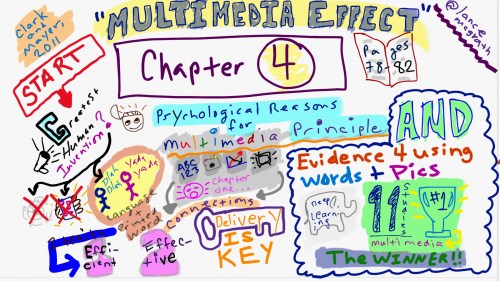
McGrath_sketchnote

Click HERE for a larger PNG version of the sketchnote pictured above

This week in EDTECH 513, Multimedia, we were tasked with creating a sketchnote of a portion of our course text, e-Learning and the science of instruction, by Clark and Mayer. Sketchnoting, for those not in the know, is basically note-taking with doodles. It is enhanced note-taking that leverages the multimedia principle, which posits that words and graphics are more effective in communicating a message rather than plain text. Some sketchnotes are incredibly detailed works of comic-style art. These are often hand drawn in gorgeous notebooks with rich paper and an arsenal of writing instruments. Others are computer-generated and take the form of infographics. These sketchnotes might utilize clip-art and computer-generated fonts. Since I am in an educational technology class, I decided to stretch myself outside of my comfort zone (it takes me a while to draw) and draw my sketchnote freehand on my touchscreen Dell Inspiron 15 7000. The process went remarkably well. More about that later.

What did I sketchnote about? I chose to sketchnote about two concepts discussed by Clark and Mayer in Chapter 4 of their text. The first was the psychological reasons for the multimedia principle and the second was the evidence for using words and pictures to enhance learning.  The sketchnote provides a guide to the sections using both text and images. The first thing to note, by beginning at the big red START, is that the authors observed that language is quite possibly the greatest human invention, followed by written language. It is effective and efficient. The addition of graphics makes communication multimedia in nature and increases the connections to the message and the content. Delivery is key. Format is not as important. There is evidence that using multimedia leads to deeper learning. This is backed up by the findings of eleven research studies. The concept of the multimedia effect, that words and pictures are better at helping humans learn than just words, holds overarches the entire section.

How did the whole process go? As I mentioned above, it went well. I decided to take the plunge and draw my entire sketchnote freehand on my computer. I have never done this before. I have some issues with fine motor control and much prefer to use clip-art for images and typed letters for textual communication, if only in the interest of legibility and time.  I will probably use an infographic application to generate other sketchnotes in the future. I can concentrate more on delivering content instead of having to redraw images that do not turn out right. Alternately, I might create sketchnotes using pen and paper and then digitize the final result. The task was enjoyable, but time-consuming for me given my novice status in drawing on a touchscreen. I rendered the sketchnote on a Dell Inspiron 15 7000 in Plumbago, a Microsoft application. I used a Dimples Excel stylus with the silicone end, not the larger fabric stylus tip. The screen was responsive to the stylus and the screen did not pick up much palm activity and register it as input. The image was drawn without zooming in for detail work. I need to spend more time exploring the Plumbago app and the full suite of settings and features. The process of sketchnoting my notes really helped me to forge strong connections to the material. My brain had to work both the verbal and spatial areas in order to plan out and create the sketchnote artifact.

There are many examples of sketchnoting on the Internet. I hope that seeing what I have done encourages you to give sketchnoting a try, either for yourself or with your students.

By completing this activity, I demonstrated competence of AECT standards 1.2. Message Design, 1.3 Instructional Strategies, and 2.3 Computer-Based Technologies. The activity meets the requirements of AECT 1.2 because I planned and designed the creation of a message in the form of a sketchnote, which leverages the multimedia effect to deliver a message in a manner that benefits the learner. The activity also supports AECT 1.3 because the creation of the sketchnote is a purposeful instructional strategy that will contribute to student learning. Finally, the activity supports AECT 2.3 because the artifact, a digital sketchnote, was generated and delivered using computer-based technology exclusively.

Best,
Lance

Reference:

Clark, R. C., & Mayer, R. E. (2011). E-learning and the science of instruction: Proven guidelines for consumers and designers of multimedia learning. San Francisco, CA: Pfeiffer.


5 Comments

Filed under 3.1 Creating, 3.2 Using