Category Archives: 3.1 Creating

Candidates create instructional design products based on learning principles and research-based best practices. (pp. 8, 243-245, 246)

Worked Example

The final assignment in my EDTECH 513 class on multimedia at Boise State University focused on creating a worked example video. A worked example is basically a How-To video that uses research-based multimedia methods to create an e-learning artifact. For my video, I chose to concentrate on a topic that comes up frequently in my interactions with students at the college at which I work: peer reviewed journal articles. Many students come to the college with a working knowledge of libraries. They know we have books they can borrow, probably some videos, and maybe some reference materials. Those same students, however, do not know much about journal literature and the special place it occupies in academia. With that in mind, I went about planning for and creating my video.

First, I thought about the face-to-face instruction I provide to students on the topic of peer reviewed journal literature. I run a series of short, drop-in style lessons during the school year called Bite Size Library Lessons. The lessons are designed to be delivered in under 30 minutes, with 15 minutes being the target. This leaves time to adequately cover the topic and leave time for conversation.

Next, I created a script based on the lesson plans and conversations that take place during a typical lesson.

Third, I created some PowerPoint slides to use in providing pretraining for students on the technical terms associated with the topic, especially the term “peer reviewed”. I also discussed the differences between databases and search engines in the pretraining portion of the video. In the pretraining section of the video, I followed best practices in multimedia development including the redundancy principle (I used limited text except for the discussion of technical terms) and the coherence principle (see the visuals displayed during the What Does Peer Reviewed mean?), and the personalization principle (I am visually present in the video and use personalized language. I also used music for the intro and outro, making sure that the music did not distract the learner from the content.).

Fourth, I recorded myself working through a search, applying filters and sorting results as I went along, and finally viewing a full text, peer reviewed journal article. I used Camtasia for the creation of the video and used some of the callout features as appropriate.

By creating this worked example artifact I have demonstrated competence in AECT Standards 3.1 – Creating and 3.2 Using.  As to standard 3.1, I created a worked example video in compliance with multimedia instruction principles and research-based best practices, including adhering to the redundancy, coherence, and personalization principles. As to standard 3.2, made sound professional decisions regarding the selection of appropriate processes and resources to use in providing conditions that optimized the learning potential of this worked example artifact. I considered the learning objectives I wanted to communicate to learners, determined the best way to deliver the lesson using an approach that was solidly grounded in current multimedia theory practices.


Leave a comment

Filed under 3.1 Creating, 3.2 Using, Standard 3: Learning Environments, Uncategorized

The Personalization Principle

Link to video

Link to video with a lesson

Thus far in EDTECH 513 – Multimedia, the class has focused on how to create messages using multimedia that provide meaningful visual messages and leverage modalities of information acquisition, primarily sight and audition, for the creation of effective learning artifacts. The Personalization Principle, as described by Clark & Mayer, provides a means for further customizing elearning materials to the needs of specific groups of students or a single student, depending on the situation.

What is the Personalization Principle? It is a tripartite principle that seeks to bring the human into elearning environments.

conversationFirst, this personalization is achieved by promoting the use of an informal communication style and a friendly human voice in elearning. According to this tenet, instructors should strive to provide a casual communication style that is balanced with professionalism. It should be neither so casual that students fail to take the class seriously nor so formal that they feel utterly disconnected from the human instructor. Voice quality and politeness, suggesting rather than stating, for example, is also strongly supported by research. It is also important to avoid sounding monotone or robotic, as this offers a much less engaging learning environment. People prefer other people. The literature also suggests that standard accents promote learning more so than foreign accents.

robo

Avoid sounding robotic.

coachThe second tenet of personalization is the use of on-screen coaches to engage students and help facilitate learning. These coaches do not need to be human. Nor do they have to be animated. Coaches can look like people, or they can take the form of animated objects or fantastical creatures. The most important factor to keep in mind is what will work best for the learners. Once again, make sure the “voice” of the coach, either written or spoken, is authentic. The point is to offer an interaction opportunity with a genuine conversational quality.

The third and final tenet of the Personalization Principle is support for author visibility. In many cases, writers of educational material are encouraged to be invisible and stay out of the learner’s access to the content. However, research into personalization has revealed that a visible author provides a distinct benefit to student learning. Authors of elearning materials can reveal themselves by using an interview style instead of reporting information or by including themselves in examples. This is similar to using “I” statements in a physical classroom as you work through a live problem or activity. I do this regularly in my library instruction classes. “When I conduct a search and I do not see the results I expect, here is what I do…” is a very common thing for me to say.

As I worked through the assignment, I made sure to follow the other multimedia principles I have learned about this semester. For example, I adhered to the Redundancy Principle by keeping extraneous text to a minimum, opting instead to use still images and let the text already present in the images suffice.

There are some open questions that remain concerning personalization, but we do know that personalization helps students engage more deeply with elearning courses.

As far as this particular assignment, we were tasked with creating a digital storytelling artifact. However, since the assignment was rather flexible, I chose to create two digital stories: one lesson and one personal. The lesson teaches the Personalization Principle explicitly while following the tenets established in the principle itself and the personal story is the story of how I came to be an academic librarian. The story is mostly complete, but that is understandable given the three minute duration limit for the assignment. I will continue to develop my digital storytelling skills and incorporate this powerful tool for elearning into my role as an academic librarian.

By completing this activity I have demonstrated an understanding of and have met AECT Standards 3.1- Creating and 3.2-Using.  As for Standard 3.1 – I created a digital story wherein I presented content that was presented in a personalize (informal/casual) manner in alignment with Meyer’s description of the Personalization Principle.

As for Standard 3.2 – I created a script, researched and selected images, and learned how to use software that provided the optimal conditions for learning based on principles, theories and effective practices.

Reference:
Clark, R. C., & Mayer, R. E. (2016). E-learning and the science of instruction: Proven guidelines for consumers and designers of multimedia learning.

Leave a comment

Filed under 3.1 Creating, 3.2 Using, Standard 3: Learning Environments, Uncategorized

Narrated Presentation

VoiceThread

Follow this link to visit the VoiceThread presentation:
https://voicethread.com/app/player/?threadId=10508084

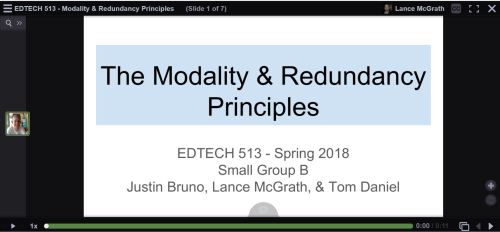
The past two weeks in EDTECH 513 we have been learning about more multimedia principles. Our class broke up into groups for some collaborative work. Each group was tasked with creating a Google Slides presentation, converting it to a PDF, uploading it to VoiceThread, and narrating the presentation. The final product is a multimedia presentation that adheres to the Modality Principle and the Redundancy Principles. Let’s unpack these terms a bit.

The creation of multimedia artifacts that are both visually appealing and pedagogically sound takes time and study. The ability to craft a compelling presentation is not something that happens magically or intuitively. Research-based multimedia principles offer substantial assistance in the development of expertly crafted multimedia content. Two such principles are the Modality Principle and the Redundancy Principles. The Modality Principle states that, when graphics are present, it is best to provide audio explanation rather than printed text. The Redundancy Principles take modality one step further and discourage the use of redundant information in the form of graphics/text/narration. This redundancy causes an overload of the learner’s cognitive channels. This understanding of cognition runs counter to the old wisdom grounded in “learning styles” which, in the case of a presentation, could lead to a potpourri of information with something for everyone: graphics/text/narration. Of course, there are exceptions to these rules, as there are with any stated regulations. In this case, the exceptions are known as boundary conditions.  These exceptions come into play when there are no graphics, when the materials are slower or learner-paced, where there are technical terms, or when the on-screen text is genuinely shorter than the narration.

When I was in high school and college as an undergraduate student, learning styles provided the basis for many sound pedagogical practices. I was presented with many lectures that included lots of text (gotta deliver that content!), an abundance of graphics (because – Hey! – the kids like pretty pictures!), and narration (I’m the teacher. I have to do something). Far from helping me learn better, these practices served to create a lot of psychological noise for me. I would get lost between the graphics, on-screen (overhead) text, and the teacher’s voice. Sometimes the teacher would go off on tangents, thus making it especially hard to know what to attend to.

In the past, I have been guilty of trying to do too much with PowerPoints and other lecture material. I would fade graphics and use smaller fonts in order to cram as much onto a slide as I possibly could. More is better, right? It gives students the option to learn the way that works for them. The ol’ shotgun approach to information delivery. Oh, how wrong I was! Now that I have learned about the Modality Principle and the Redundancy Principles, I can appreciate the value having less on a slide brings to my students, pedagogically speaking. I have begun using less text and, with the text I do provide, I strive to reduce the text to the very essence of what the students need. The adoption of multimedia practices that adhere to these research-based and proven principles will greatly benefit my students.

The creation of this artifact meets AECT standards 1.2 – Message Design, 1.3 – Instructional Strategies, 2.2 – Audiovisual Strategies, and 2.3 – Computer-based Technologies. First, this artifact meets AECT Standard 1.2. As with the multimedia tutorial I created using HaikuDeck, we followed a systematic method in the creation of this presentation. My group collaborated on the draft of the presentation in a Google Doc and used email and commenting to work out the details. We selected images from stock files in order to communicate our message about the Modality and Redundancy Principles.  We also relied on narration instead of text, instead using on-screen text in carefully controlled amounts. The result was a well-designed message that is aligned with research-based multimedia design principles.  Second, regarding Standard 1.3, we utilized the instructional multimedia design principles of the Modality Principle and the Redundancy Principles, making sure to only violate these rules when appropriate based on a thorough evaluation of the relevant boundary conditions. Images were thoughtfully selected and used as the primary means of communication along with narration.  Text on slides was kept to a minimum, except in the case of example slides. Third, Standard 2.2 was supported because of the use of audio and graphics to present a message that is based in solid multimedia research. Fourth, in support of Standard 2.3, we used Google Docs, Google Slides, and VoiceThread, all web-based software applications, to create the presentation. Finally, I distributed it by embedding it on my WordPress blog.

This activity also meets the revised AECT Standards 3.1 Creating, 3.2 Using, and 4.1 Collaborating. 3.1 Creating: Candidates create instructional design products based on learning principles and research-based best practices. I created a multimedia presentation that adhered to the Modality and Redundancy Principles. 3.2 Using: Candidates make professionally sound decisions in selecting appropriate processes and resources to provide optimal conditions for learning based on principles, theories, and effective practices. I used a draft process with my group that involved Google Docs and Slides. Once the drafts were finished, I created a PDF and uploaded it to VoiceThread so my group could add narration and finish the presentation.  4.1 Collaborative Practice: Candidates collaborate with their peers and subject matter experts to analyze learners, develop and design instruction, and evaluate its impact on learners. I collaborated effectively with my group members to analyze the needs of our anticipated learners, developed the instructional presentation that met multimedia design requirements. We also considered the impact our instructional materials, both content and design, would have on potential learners.

Until next time, keep reading!

-Lance


Leave a comment

Filed under 3.1 Creating, 3.2 Using, 4.1 Collaborative Practice, Uncategorized

HaikuDeck Artifact

Screenshot of the title page for a Haiku Deck presentation for Cruzen Murray Library

Haiku Deck presentation for the Cruzen-Murray Library at The College of Idaho

Follow the link below to view the Haiku Deck:

This week in EDTECH 513 we explored Haiku Deck. For those unfamiliar, Haiku Deck is a browser-based presentation tool similar to PowerPoint or Google Slides. The upside to Haiku Deck is that the amount of text that can be placed on a slide is limited. “Madness!” you say, “I want to be overwhelmed by volumes of text and placed in a PowerPoint coma!” Yes, I understand. Some might consider this a downside, but there is a definite positive effect inherent in this method. The power of visual communication is allowed to exercise its strength. This is the multimedia principle in very lean form. The images are allowed to communicate the core message. Text is given a space on the side bar. Words are still present, but they are not granted the prime real estate normally reserved them on the printed page.

It was a real pleasure to work on this particular class activity. I was provided with an opportunity to share information about an absolutely incredible new building on the campus of The College of Idaho: The Cruzen-Murray Library. (My new work home!) After a year of construction, the library just opened a few weeks ago at the beginning of February. The Haiku Deck platform provided a perfect digital platform to showcase both the library itself and the ideas behind its form and function. The alignment of class application and need for an expressive outlet could not have come together more seamlessly for me.

The project provided more evidence to me, as an educator and communicator, of the power of multimedia to deliver a message. Images, in collaboration with appropriately placed text, are incredibly powerful communication devices. I am excited to continue to learn more ways of applying the multimedia principle in all of the materials I develop – from handouts to presentations.

The creation of this artifact meets AECT standards 1.2 – Message Design, 1.3 – Instructional Strategies, and 2.3 – Computer-based Technologies. First, this artifact meets AECT Standard 1.2. As with the static multimedia tutorial I created using the (almost) defunct Clarify-it I followed a systematic method in the creation of this presentation. The images were carefully curated from personal and stock images in order to tell the story of the Cruzen-Murray Library and deliver a well-designed message that is aligned with the research-based multimedia design principle.  Second, regarding Standard 1.3, I utilized the instructional multimedia design principles of the contiguity principle and the chunking principle. Images were placed in positions of primary focus and words which conveyed core ideas were superimposed on the images in legible fonts in a contrasting color. Supporting text was placed in the appropriate section for speaker notes. Text on slides was kept to a minimum. Third, in support of Standard 2.3, I used HaikuDeck, a web-based software application to create the presentation and distributed it by embedding it on my WordPress blog. The presentation is ready for sharing with others in a formal presentation or at the viewers leisure via the Internet.

Thanks for reading!

-Lance

Leave a comment

Filed under 3.1 Creating, 3.2 Using, Uncategorized

Static Multimedia Tutorial

This week in EDTECH 513 – Multimedia, we were tasked with creating a static multimedia tutorial on the topic of our choosing. What is a static multimedia tutorial? Doesn’t multimedia mean sound and movement? I am glad you asked! A static multimedia tutorial is a tutorial that incorporates multimedia principles such as the use of images along with text designed in compliance with research-based design standards such as the contiguity principle. The contiguity principle states that words should be aligned with corresponding graphics. Legends that sit off to the side, away from associated graphics, for example, should not be used. Here is a great article from Moreno and Mayer about the contiguity principle (PDF).

I am an academic librarian, so the static multimedia tutorial I chose to create was library related. We receive lots of questions from new students on how to use the library. Many students come to college having used a high school library that was not supported by a modern library management system (LMS) or a public library system that was both organized using the Dewey Decimal System (we use Library of Congress) and a different LMS geared more towards public libraries. In the interest of serving the students better, I decided a basic, introductory tutorial of just seven steps would be useful. The learning objective for the tutorial is straightforward: “After following the steps in this tutorial, learners will be able to construct a search for book records in the library catalog and analyze the search results to determine a book’s owning library, format, location, availability, and call number.

I used Clarify-it to grab the screenshots and create the step-by-step instructions. The process I followed was the same one I have used to create static tutorials in the past. First, I determined the learning outcome for the tutorial. Second, I worked through the steps and documented each one. Third, I wrote down instructions for each step. Then I opened Clarify-it, formatted the pages, and started harvesting and adding screenshots. After adding the screenshots, I added strategically placed call-out boxes and arrows to draw attention to important sections of the screen. I kept instructional text close to the images (within the call-out boxes and near or connected to arrows pointing to targeted text and webpage icons).  Due to page layout, I had to place call-out boxes further from the targeted sections than I would have liked, but the design made sense given the constraints of the source material. The process was similar to using the screenshot function in Jing, SnagIt, or other screengrabbing software. I have used static tutorials in the past for library instruction, but moved away from them in favor of screencasts. I can understand the appeal of a static multimedia tutorial (no need to pause a video and continue, for example) and think I will make more of them to place on our library’s libguides for students and faculty.

Clarify-it was easy to use and had a decent set of features. I would use it again. Unfortunately, the developers of Clarify-it have decided to sunset the product in favor of pursuing other opportunities. I will need to find another application to use for creating static tutorials. I really do not want to go back to using Word or PowerPoint.

The creation of this artifact meets AECT standards 1.2 – Message Design, 1.3 – Instructional Strategies, and 2.3 – Computer-based Technologies. First, as to Standard 1.2, I followed a systematized method for creating a static multimedia tutorial artifact that can and will be used by students in learning how to successfully use the library catalog. The message was designed in accordance with the contiguity principle, which is a research-based multimedia design principle. Second, as to Standard 1.3, I utilized appropriate instructional multimedia design principles, most notably the contiguity principle and chunking principle. Third, as to Standard 2.3, I used Clarify-it, a web-based software application to create the tutorial and convert it to a PDF. I then uploaded the PDF to a shared Google Drive, set the sharing option to “Anyone with link can view”, and grabbed the embed code to make it accessible via my WordPress blog. The tutorial is ready for incorporation on the library libguides and for formal instruction with students.

Thanks for reading!

Best,
Lance


2 Comments

Filed under 3.1 Creating, 3.2 Using, Uncategorized

Sketchnoting in EDTECH 513

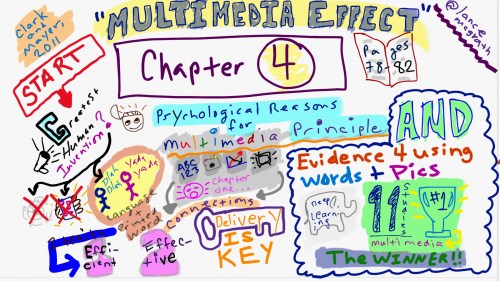
McGrath_sketchnote

Click HERE for a larger PNG version of the sketchnote pictured above

This week in EDTECH 513, Multimedia, we were tasked with creating a sketchnote of a portion of our course text, e-Learning and the science of instruction, by Clark and Mayer. Sketchnoting, for those not in the know, is basically note-taking with doodles. It is enhanced note-taking that leverages the multimedia principle, which posits that words and graphics are more effective in communicating a message rather than plain text. Some sketchnotes are incredibly detailed works of comic-style art. These are often hand drawn in gorgeous notebooks with rich paper and an arsenal of writing instruments. Others are computer-generated and take the form of infographics. These sketchnotes might utilize clip-art and computer-generated fonts. Since I am in an educational technology class, I decided to stretch myself outside of my comfort zone (it takes me a while to draw) and draw my sketchnote freehand on my touchscreen Dell Inspiron 15 7000. The process went remarkably well. More about that later.

What did I sketchnote about? I chose to sketchnote about two concepts discussed by Clark and Mayer in Chapter 4 of their text. The first was the psychological reasons for the multimedia principle and the second was the evidence for using words and pictures to enhance learning.  The sketchnote provides a guide to the sections using both text and images. The first thing to note, by beginning at the big red START, is that the authors observed that language is quite possibly the greatest human invention, followed by written language. It is effective and efficient. The addition of graphics makes communication multimedia in nature and increases the connections to the message and the content. Delivery is key. Format is not as important. There is evidence that using multimedia leads to deeper learning. This is backed up by the findings of eleven research studies. The concept of the multimedia effect, that words and pictures are better at helping humans learn than just words, holds overarches the entire section.

How did the whole process go? As I mentioned above, it went well. I decided to take the plunge and draw my entire sketchnote freehand on my computer. I have never done this before. I have some issues with fine motor control and much prefer to use clip-art for images and typed letters for textual communication, if only in the interest of legibility and time.  I will probably use an infographic application to generate other sketchnotes in the future. I can concentrate more on delivering content instead of having to redraw images that do not turn out right. Alternately, I might create sketchnotes using pen and paper and then digitize the final result. The task was enjoyable, but time-consuming for me given my novice status in drawing on a touchscreen. I rendered the sketchnote on a Dell Inspiron 15 7000 in Plumbago, a Microsoft application. I used a Dimples Excel stylus with the silicone end, not the larger fabric stylus tip. The screen was responsive to the stylus and the screen did not pick up much palm activity and register it as input. The image was drawn without zooming in for detail work. I need to spend more time exploring the Plumbago app and the full suite of settings and features. The process of sketchnoting my notes really helped me to forge strong connections to the material. My brain had to work both the verbal and spatial areas in order to plan out and create the sketchnote artifact.

There are many examples of sketchnoting on the Internet. I hope that seeing what I have done encourages you to give sketchnoting a try, either for yourself or with your students.

By completing this activity, I demonstrated competence of AECT standards 1.2. Message Design, 1.3 Instructional Strategies, and 2.3 Computer-Based Technologies. The activity meets the requirements of AECT 1.2 because I planned and designed the creation of a message in the form of a sketchnote, which leverages the multimedia effect to deliver a message in a manner that benefits the learner. The activity also supports AECT 1.3 because the creation of the sketchnote is a purposeful instructional strategy that will contribute to student learning. Finally, the activity supports AECT 2.3 because the artifact, a digital sketchnote, was generated and delivered using computer-based technology exclusively.

Best,
Lance

Reference:

Clark, R. C., & Mayer, R. E. (2011). E-learning and the science of instruction: Proven guidelines for consumers and designers of multimedia learning. San Francisco, CA: Pfeiffer.


5 Comments

Filed under 3.1 Creating, 3.2 Using

Tech Trends Assignment

(Image credit: www.hotbloodedgaming.com)

The NMC Horizon Report, an annual joint publication of the New Media Consortium and the Educause Learning Initiative, highlights emerging trends in educational technology.  The latest report that has been published is the 2012 Higher Education Edition.  This edition of the report examines the possible (and probable) development of technology in education over the next 1-5 years.  The language used by Johnson, Adams and Cummins of the NMC Horizon Report for this edtechvolution is the “time-to-adoption horizon.”  The Report is meant to “indicate likely timeframes for their entrance into mainstream use for teaching, learning, and creative inquiry” (p. 6).  Three time-to-adoption horizons (One Year or Less; Two to Three Years; and Four to Five Years) were identified in the report.  Two technologies were associated with each horizon: Mobile Apps and Tablet Computing – One year or less; Game-Based Learning and Learning Analytics – Two to three years; and Gesture-Based Computing and The Internet of Things – Four to five years.

I chose to focus on the emerging educational technology of game-based learning.  As the father of two boys (ages 13 and 10) and as an academic librarian working with traditional undergraduate students, I am very aware of the impact of video games in our culture.  I have often wondered about the educational opportunities to be found in “fun” games (not just games marketed as being educational).  What, for example, are my sons learning when they play Lego Star Wars?  What are the college students learning when they play late night sessions of the massively multiplayer online (MMO) game Halo?  Is there “educational” value to be had or are these just the cerebral version of junk food?

What I read in the Horizon Report encouraged me.  The authors of the Report (2012) note “this type of game brings many players together to work on activities that require collaborative problem solving” (p. 19).  Collins & Halverson (2010) observed, “gaming may help young people learn a variety of leadership skills, such as resource allocation, negotiating with friends and adversaries, manipulating situations and environments, actively pursuing their goals andrecovering from failure” (p. 22).

Armed with this information and material from other researchers I decided to pursue a lesson involving the integration of the emerging technology of game-based learning and the Idaho history curriculum for the fourth grade.  I often help with Idaho History Day and volunteer at the school my children attend.   My boys have recently discovered the game Minecraft and I saw some potential there for educational application.  They have shared with me that other kids at their school, boys and girls alike, enjoy playing Minecraft.

What I developed was an initial lesson plan using Minecraft to integrate the teaching of Idaho history and math.  Students use the simulated world of Minecraft to create their own early Idaho settlement and build their own house. Along the way, the math concepts of perimeter and area are reinforced.   Minecraft allows for a game-based learning experience that is physically safe (no one is injured while building a house) and brings math and history to life thus providing strong elements of fun and motivation.

This particular assignment for EDTECH 501 supports several AECT standards including Standard 1.1 Instructional Systems Design, Standard 3.1 Media Utilization and Standard 3.3 Implementation and Institutionalization.  The act of creating material for instruction meets the requirements of Standard 1.1.  The intentional (“systematic”) use of the technology resources of computers, video and a gaming environment for this assignment support Standard 3.1 Media Utilization.  The fact that this lesson plan exists and can be used in a rudimentary sense in a classroom (there is no Minecraft Idaho seed but any Minecraft seed would allow for this activity) supports the implementation and institutionalization components in Standard 3.3.

During the course of the assignment I was reminded of how challenging it is for me to think in the micro world of lesson plans.  I am much more of an abstract-random, big idea, creative, macro-focused thinker.  It’s not to say that I cannot do lesson plans.  They just do not come naturally for me.  I am so glad that I work with many talented and available educators who were willing to let me bounce my ideas off of them.  It also took a while to create the additional collateral materials.  This is one of the banes of creating original content.  This was a very stimulating and rewarding project.  My boys are quite excited about the possibility of exploring the Minecraft Idaho seed (created worlds).  Perhaps I will enlist them in helping me create the seed world for use in their school.

References:
Collins, A. A., & Halverson, R. R. (2010). The second educational revolution: rethinking education in the age of technology. Journal Of Computer Assisted Learning, 26(1), 18-27. doi:10.1111/j.1365-2729.2009.00339.x

Johnson, L., Adams, S., and Cummins, M. (2012). The NMC Horizon Report: 2012 Higher Education Edition. Austin, Texas: The New Media Consortium.

2 Comments

Filed under 1.1 Creating, 3.1 Creating, 3.3 Assessing/Evaluating, Standard 1: Content Knowledge, Standard 3: Learning Environments