Category Archives: Standard 1: Content Knowledge

Candidates demonstrate the knowledge necessary to create, use, assess, and manage theoretical and practical applications of educational technologies and processes.

Coherence Analysis

Here is a link to view the original Google Doc.

One of the course activities in EDTECH 513 – Multimedia requires learning about and demonstrating working knowledge of the Coherence Principle. This is achieved through the process of conducting a coherence analysis on at least one multimedia e-learning artifact that is not in compliance with the Coherence Principle and then rendering a revised and compliant version of one of the artifacts.  First, it is important to understand what the Coherence Principle is and how a coherence analysis is conducted.

The Coherence Principle, as it relates to multimedia, states that “information in the form of added text, added graphics, and background sound” should not be included in e-learning artifacts (Clark & Mayer, 2016, p. 152). This means all of the swirling transition effects, sweet graphics, and boing-boing sound effects that are available to dress up any mundane PowerPoint are, for the most part, forbidden in the interest of creating e-learning materials that are truly supportive learner success. A coherence analysis is the process of evaluating an e-learning presentation to determine if its design aligns with the requirements of the of the Coherence Principle concerning extraneous or unrelated text, graphics, or sound.

My daughter, K, is in elementary school. She is an inquisitive child and always full of questions. Lately, she has been very interested in anatomy, especially the human eye. Because of this curiosity about the human body, I have spent a lot of time looking at resources about eyeballs.  It should come as no surprise, then, that I decided to conduct a coherence analysis on e-learning artifacts on the human eye.

I analyzed two artifacts that provided information about the human eye: one animated video and one static slide from a SlideShare presentation. The subject matter was the main connection between the two artifacts, not the presentation style. As the father of a young learner I wanted to investigate an artifact aimed at children and, as an academic librarian, one aimed at older learners.  The animated video was directed at young learners. It contained many violations of the Coherence Principle in the form of extraneous graphics, distracting animations, background music, and unnecessary text. The static slide was slightly better. The violations present on the slide pertained to extraneous text and complex graphics where simple graphics would have produced less visual noise for the learner. Here is the original static slide.
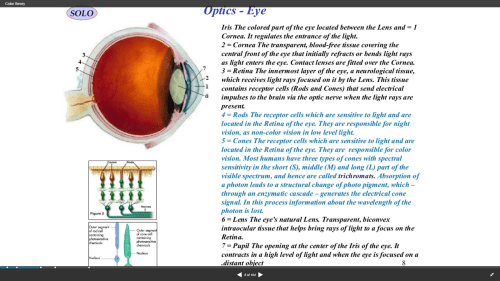
Screenshot 2018-03-16 10.17.59

I revised the static slide in order to make it compliant with the Coherence Principle. I limited the text, reduced the number of graphics, and used a simpler graphic to represent the eye. Additionally, the revised text was added in alignment with the Contiguity Principle, which states that text should be placed near related graphics. Here is the revised slide.
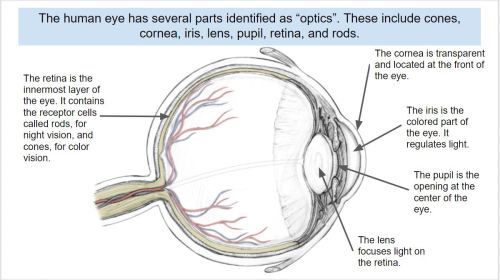
Coherence Theory compliant

The exercise was very beneficial to expanding my understanding of the Coherence Principle. I also enjoyed deconstructing an artifact and making improvements to it that enhance its usefulness to learners.

The creation of this artifact meets AECT standards 1.2 – Message Design, 1.3 – Instructional Strategies, and AECT Revised standard 1.3 Assessing/Evaluating.  I demonstrated competence in the area of message design by analyzing existing e-learning artifacts, deconstructing them, and revising them to meet learner needs according to research-based principles. Additionally, the activity required me to consider the appropriate instructional strategies to use in delivering e-learning content to learners. Finally, the process of conducting a Coherence Analysis and revising the static slide provided me with the opportunity to effectively integrate the e-learning materials into a Google Document for distribution to learners.

Until next time, keep reading!

Best,
Lance

4 Comments

Filed under 1.3 Assessing/Evaluating, Standard 1: Content Knowledge, Uncategorized

Tech Trends Assignment

(Image credit: www.hotbloodedgaming.com)

The NMC Horizon Report, an annual joint publication of the New Media Consortium and the Educause Learning Initiative, highlights emerging trends in educational technology.  The latest report that has been published is the 2012 Higher Education Edition.  This edition of the report examines the possible (and probable) development of technology in education over the next 1-5 years.  The language used by Johnson, Adams and Cummins of the NMC Horizon Report for this edtechvolution is the “time-to-adoption horizon.”  The Report is meant to “indicate likely timeframes for their entrance into mainstream use for teaching, learning, and creative inquiry” (p. 6).  Three time-to-adoption horizons (One Year or Less; Two to Three Years; and Four to Five Years) were identified in the report.  Two technologies were associated with each horizon: Mobile Apps and Tablet Computing – One year or less; Game-Based Learning and Learning Analytics – Two to three years; and Gesture-Based Computing and The Internet of Things – Four to five years.

I chose to focus on the emerging educational technology of game-based learning.  As the father of two boys (ages 13 and 10) and as an academic librarian working with traditional undergraduate students, I am very aware of the impact of video games in our culture.  I have often wondered about the educational opportunities to be found in “fun” games (not just games marketed as being educational).  What, for example, are my sons learning when they play Lego Star Wars?  What are the college students learning when they play late night sessions of the massively multiplayer online (MMO) game Halo?  Is there “educational” value to be had or are these just the cerebral version of junk food?

What I read in the Horizon Report encouraged me.  The authors of the Report (2012) note “this type of game brings many players together to work on activities that require collaborative problem solving” (p. 19).  Collins & Halverson (2010) observed, “gaming may help young people learn a variety of leadership skills, such as resource allocation, negotiating with friends and adversaries, manipulating situations and environments, actively pursuing their goals andrecovering from failure” (p. 22).

Armed with this information and material from other researchers I decided to pursue a lesson involving the integration of the emerging technology of game-based learning and the Idaho history curriculum for the fourth grade.  I often help with Idaho History Day and volunteer at the school my children attend.   My boys have recently discovered the game Minecraft and I saw some potential there for educational application.  They have shared with me that other kids at their school, boys and girls alike, enjoy playing Minecraft.

What I developed was an initial lesson plan using Minecraft to integrate the teaching of Idaho history and math.  Students use the simulated world of Minecraft to create their own early Idaho settlement and build their own house. Along the way, the math concepts of perimeter and area are reinforced.   Minecraft allows for a game-based learning experience that is physically safe (no one is injured while building a house) and brings math and history to life thus providing strong elements of fun and motivation.

This particular assignment for EDTECH 501 supports several AECT standards including Standard 1.1 Instructional Systems Design, Standard 3.1 Media Utilization and Standard 3.3 Implementation and Institutionalization.  The act of creating material for instruction meets the requirements of Standard 1.1.  The intentional (“systematic”) use of the technology resources of computers, video and a gaming environment for this assignment support Standard 3.1 Media Utilization.  The fact that this lesson plan exists and can be used in a rudimentary sense in a classroom (there is no Minecraft Idaho seed but any Minecraft seed would allow for this activity) supports the implementation and institutionalization components in Standard 3.3.

During the course of the assignment I was reminded of how challenging it is for me to think in the micro world of lesson plans.  I am much more of an abstract-random, big idea, creative, macro-focused thinker.  It’s not to say that I cannot do lesson plans.  They just do not come naturally for me.  I am so glad that I work with many talented and available educators who were willing to let me bounce my ideas off of them.  It also took a while to create the additional collateral materials.  This is one of the banes of creating original content.  This was a very stimulating and rewarding project.  My boys are quite excited about the possibility of exploring the Minecraft Idaho seed (created worlds).  Perhaps I will enlist them in helping me create the seed world for use in their school.

References:
Collins, A. A., & Halverson, R. R. (2010). The second educational revolution: rethinking education in the age of technology. Journal Of Computer Assisted Learning, 26(1), 18-27. doi:10.1111/j.1365-2729.2009.00339.x

Johnson, L., Adams, S., and Cummins, M. (2012). The NMC Horizon Report: 2012 Higher Education Edition. Austin, Texas: The New Media Consortium.

2 Comments

Filed under 1.1 Creating, 3.1 Creating, 3.3 Assessing/Evaluating, Standard 1: Content Knowledge, Standard 3: Learning Environments

RSS for Education

Librarians live off of information and helping people access and use information.  It is our currency, our purpose, our reason to push the power button in the morning.  That being the case, it only makes sense that RSS (Rich Site Summary or Really Simple Syndication), a web technology that allows users to subscribe to content from RSS enabled web sites, would be part and parcel of our everyday lives in Libraryland.  And so it is.  At least for me.

“How do you use RSS?” you ask.  Integration with existing tools is a great way to use a complementary technology such as RSS.

One of the tools that we use in the Riley Library at Northwest Nazarene University is LibGuides.  LibGuides are a web product from SpringShare that allow librarians to create microsites that are targeted to specific library user needs.  In an academic library a guide can be created for an academic program, department, course, or even a specific assignment.  It’s pretty neat!  One of the features in LibGuides is the ability to add a box with an RSS feed.  So, for a course on Business Law I added a box to the Websites page with an RSS feed from FindLaw.  Students get updated information from the world of law without even leaving the guide they are using.  This is a big deal because of all the distractions on the ‘net that eat away at valuable homework time if one isn’t careful.  RSS is one way I provide excellent service to the students I serve.

RSS is quietly efficient and effective at delivering content.  This makes it a good candidate for bundling and sharing on the main library site and on the social networking tools the library uses.  I will also be placing more RSS feeds on the LibGuides.  One opportunity I see involves departmental or discipline specific LibGuides.  The librarians serve as liaisons to the various academic departments within the university and time is a resource there is never enough of.  RSS could help our librarians with their liaison duties by streamlining the sharing of information from targeted databases and other RSS-enabled resources.  I am sure the teaching faculty would appreciate the service!

The use of a librarian (or teacher) created RSS instrument (feed, bundle, etc.) in instruction meets AECT Standard 4: Management, subsection 4.4 – Information Management, by allowing for the controlled dissemination of information from a specified source.  An RSS feed from a trusted, reliable and appropriate source provides some safeguards in the information-seeking phase of research.

RSS has been good to me so far and I look forward to continuing the relationship into the future. Below is an RSS bundle I find useful in my role as an academic librarian working with undergraduate and graduate (both master and doctoral) students, faculty and community members.  I hope you find the bundle useful, too!

RSS Feed link

As always – Read on!
Lance

Leave a comment

Filed under 1.2 Using

Learning Log Assignment

Image credit: http://st-john-rc12.lancsngfl.ac.uk

The second major assignment in the EDTECH 501 course was to begin the process of creating a learning log.  Learning logs come in many shapes and sizes.  They can take the form of a book, or a series of audio or video recordings, or, in this case, a blog.  McIntosh and Draper (2001) stated “learning logs take neither a great deal of teacher time nor much class time, but they have tremendous value for teachers and students” (p. 554).  I have found that a learning log can take as much time as I will give it.  But it is certainly worth the effort.

Much of the time I have spent with my learning log has been spent climbing the WordPress learning curve.  I have not used WordPress much.  I tried it a few years ago and was not enamored with it.  I found Blogger and, later, Google Sites, much easier to use.  This time around, however, I decided to stick it through. I am pleased with the results.

This assignment was not only interesting and engaging, it also allowed me the opportunity to actively demonstrate the utilization of two AECT Standards: Standard 2 – Development; and Standard 4.4 – Information Management.  The assignment shows that, in support of Standard 2, I have the ability and inclination to create instructional materials using computer-based technology.  The learning log assignment also demonstrates support for the information management stipulations of Standard 4.4 by planning, organizing and storing of information used for educational purposes.

Reference:
McIntosh, M.E., & Draper, R.J. (2001). Using learning logs in mathematics: Writing to learn. Mathematics Teacher, 94, 554-557.

1 Comment

Filed under 1.2 Using

Introduction video

Hello!  Welcome to my graduate program homestead on the web.  I am Lance McGrath, an academic librarian and faculty member at Northwest Nazarene University in Nampa, Idaho.  I am also a student in the Master of Educational Technology program at Boise State University.

For my first class, EDTECH 501, I created the following introduction video using a mash-up of PowerPoint, SnagIt, CyberLink YouCam and VideoPad video editor.  PowerPoint was used to create the slides.  I then used SnagIt to capture and narrate the PowerPoint in presentation mode.  Next I used the CyberLink YouCam software with the integrated camera and microphone on an HP Pavilion dv6-6c13cl laptop to record live audio and video of myself.  I used VideoPad to edit the various records into a seamless video and then laid in a soundtrack to provide some texture to the audio profile.

This video not only serves to introduce me.  It also demonstrates that I have produced an artifact which aligns with AECT Development Standard 2.4: Integrated Technologies.  Specifically, the high level of integration achieved in this video supports AECT Development indicators 2.0.1, 2.0.2 and 2.0.3 (for details see Standard 2: Development in the AECT Standards).

Please do not hesitate to contact me if you have any questions or if I can be of assistance.

Peace,
Lance

Leave a comment

Filed under 1.1 Creating